Developer Cloud Mac Workstation

A cloud Mac for developers,ready when your development cycle needs it.

Every rental gives you a dedicated Apple Silicon Cloud Mac physical node—not a virtual machine—for iOS and macOS development, continuous builds, and compatibility testing.

From $21/day · All orders are settled in USD

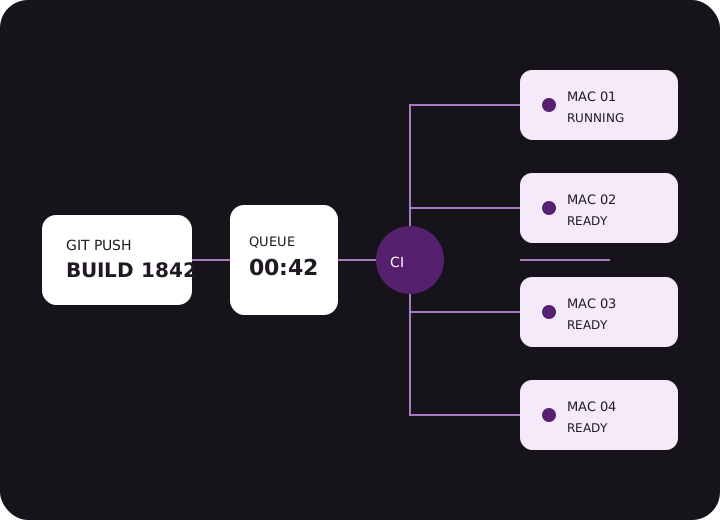
Build jobs move through a queue to four dedicated Mac nodes
PHYSICAL NODE
M4 · ACTIVE
ACCESS BOUNDARY
1 ORDER → 1 MAC
Node status is driven by live console data Check the region, configuration, and current delivery status before ordering
Available nodes 04 regions SG · JP · KR · HK
Current delivery time Live lookup Based on the order configuration page
Online status Live data Nodes operate normally 365 days a year
Real development work

One cloud Mac, threeworkflows you can run.

This is not abstract compute. You get a remotely accessible, configurable Apple Silicon dedicated physical Mac that plugs into your build workflow for clearly defined engineering tasks.

Xcode iOS Git

iOS / macOS development

Run Xcode remotely, reproduce project dependencies, isolate certificates, private keys, and signing credentials, and validate system and tool versions. Ideal for distributed collaboration, release sprints, compatibility checks, and temporary development capacity.

Explore the development workflow
CI { } PASS

CI/CD builds

Configure a GitLab CI Runner, persistent build jobs, cache directories, and artifact upload paths to bring a macOS build node into your existing pipeline. Your team manages queues, concurrency, and dependency caching around each project’s pace.

See how to connect CI
ML M4 AI

AI experiments

Run local inference, validate model compatibility, and test development tools on Apple Silicon. First verify feasibility with real models, context lengths, and memory usage before extending the runtime.

Explore experiment boundaries
DEDICATED · PHYSICAL NODE · NOT A VM

Every rentalmaps to one physical node.

You connect to a dedicated physical Mac—not a virtual machine sharing compute resources with other tenants. Model, memory, storage, region, term, and add-ons are all confirmed in the order.

  • One dedicated Apple Silicon Mac mini physical node
  • Remote access credentials are delivered for the confirmed order
  • Configure the system environment and project toolchain as needed
  • You manage passwords, private keys, signing credentials, and business backups
Boundary note: The platform operates the physical node and infrastructure; your team manages project data, development credentials, dependency sources, and build artifacts.
RESOURCE BOUNDARY / ACCESS BOUNDARY DIAGRAM
Your order

One cloud Mac in a designated region
You configure the system and toolchain

Other orders

Their own physical nodes
Outside your resource boundary

Resource relationship
1 order = 1 physical node
Access methods
Both graphical and command-line interfaces available
Instance boundary
System environments are isolated between orders
Two configurations available

Choose aMac that fits the task.

Starting at $21/day. Both configurations are available by day, week, month, or quarter in Singapore, Japan (Tokyo), South Korea (Seoul), and Hong Kong.

Larger working sets

m4-24-512

MacMLab M4 24

M4 · 24GB · 512GB

$39.8/day

$107.5/week · $199.1/month · $541.6/quarter

  • Dedicated Apple Silicon physical Mac
  • Four physical-node regions to choose from
  • For high-memory workloads, multiple projects, and larger dependency caches
  • Add SSD storage or Thunderbolt 5 pairing to your order
Check before ordering:Day, week, month, and quarter are independent billing terms and are not calculated as fixed multiples. Additional storage and Thunderbolt 5 pairing fees appear separately in the order. Availability is based on live console data.
4 physical-node regions

Keep your cloud Mac close to your team or workload.

Choose a region based on team location, code-repository and artifact flows, external dependencies, and actual network paths. Do not rely on geography alone; test connection quality from your team’s network before first use.

  • Interactive development:Prioritize the region with the most stable remote-desktop experience.
  • Continuous builds:Check code-pull, dependency-download, and artifact-upload paths together.
  • Distributed teams:Choose based on where the main operators are located, not where the company is registered.
See how to choose a node and workload region
SG / SOUTHEAST ASIA Available

Singapore

For Southeast Asian teams and regional workloads. Suitable for projects balancing regional collaboration, dependency downloads, and remote operation.

Region code: SG
JP / EAST ASIA Available

Japan (Tokyo)

For development teams in Japan and East Asia. Before choosing, consider network paths to code repositories, dependency services, and primary operators.

Region code: JP
KR / NORTHEAST ASIA Available

South Korea (Seoul)

For workloads in South Korea and Northeast Asia. Suitable for remote development, testing, and continuous builds from local networks.

Region code: KR
HK / SOUTH CHINA Available

Hong Kong

For teams in South China and Southeast Asia. Evaluate interactive latency together with transfer paths to repositories and artifact storage.

Region code: HK
Development workflow

From remote desktop to CI,plug into your existing workflow.

Build a connectable, reproducible development environment first, then add automation. Keep connection checks, environment inventories, and build-validation results for each stage to make issues easier to locate.

01

Establish a remote connection

After receiving your credentials, configure the remote desktop, security settings, and resolution. On first access, check the system version, disk space, network connectivity, and time settings.

02

Reproduce the project toolchain

Install the project’s specified Xcode, Homebrew, Git, and command-line tools. Track dependencies in a version inventory and restrict private keys and signing credentials to the required scope.

03

Connect continuous builds

Register the Runner and configure tags, cache directories, build queues, and artifact-upload paths. Start with a small reproducible job, then migrate the full pipeline step by step.

$ sw_vers ProductName: macOS $ xcodebuild -version Version: project-defined $ gitlab-runner verify Runner status: valid

PIPELINE / MACOS-M4

preparepassed
build-iosrunning
archivequeued
upload-artifactwaiting
Migration principle

Migrate the environment inventory before the jobs; validate one pipeline before increasing concurrency. Keeping connection, environment, and build stages traceable makes differences easier to troubleshoot than copying an entire local machine at once.

“A temporary release sprint should not start with buying equipment, arranging desk space, and handling on-site operations.”

When you need a macOS workstation, choose the model, region, and rental term directly. Exit at the end of the project within the order boundary—without holding hardware long-term for a short-lived workload or making remote teammates wait for equipment to move.

MacMiniLab service principles Lead with the conclusion · Verifiable data · Clear responsibility boundaries

Not sure whether to choose 16GB or 24GB? Share your project type, primary tools, rental term, and concurrency, and our support team will help assess the options using verifiable information.

Get help choosing
Check before ordering

Clarify resources, term, and responsibilities first.

The pricing page lists four billing-term prices and add-ons for both models; support documentation covers first connection, environment setup, CI integration, and troubleshooting steps.

Is this a virtual machine?

No. Every rental maps to one Cloud Mac physical node: a dedicated physical Mac, not a virtual machine. Different orders use separate physical nodes and system environments.

Which rental terms are available?

Choose by day, week, month, or quarter. Each term has its own price; the final amount depends on the model, term, region, and add-ons in the order.

How long does delivery currently take?

Current delivery time is driven by live console status rather than a fixed commitment. Check the real-time information for your selected region and configuration before ordering.

Which payment methods are supported?

Only USDT-TRC20 and Visa / Mastercard / Amex via Stripe are supported, with all charges settled in USD. Actual gateway availability is determined by the backend response.

Who manages the data and development credentials?

The platform operates the physical node and infrastructure; you manage passwords, private keys, signing credentials, development-platform credentials, and business-data backups. Do not upload sensitive credentials when submitting a support ticket.

Use a cloud Mac for your project cycle

When you need a Mac,go straight into development.

Confirm the model, region, term, and add-ons before ordering. Both configurations are dedicated Apple Silicon physical Macs, with current availability returned live by the console.

Only USDT-TRC20 and Visa / Mastercard / Amex via Stripe
All charges settled in USD